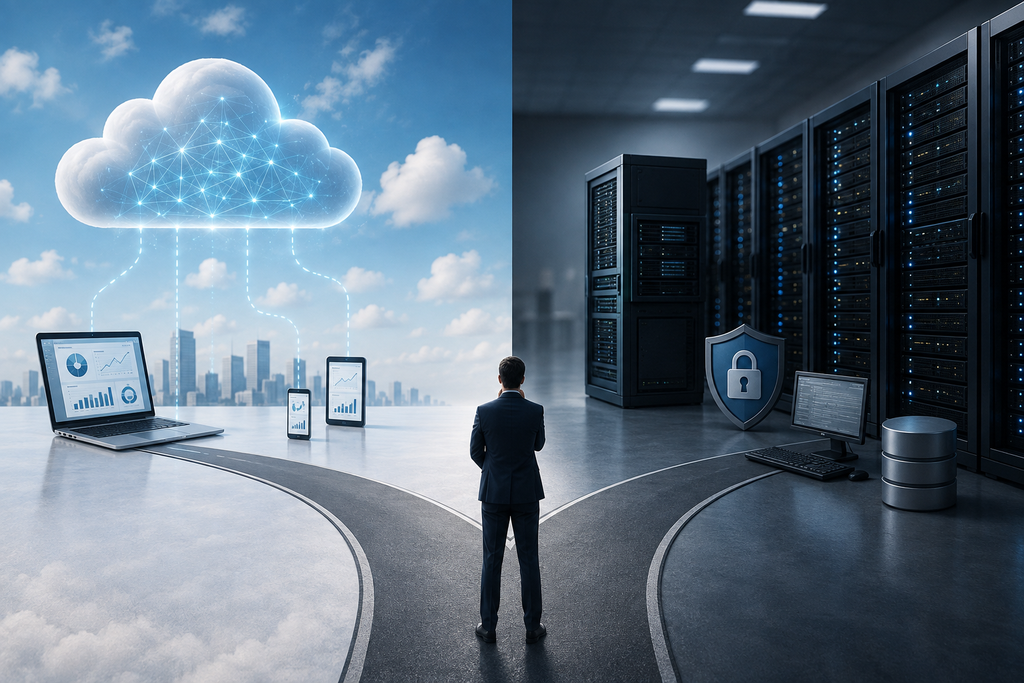
Enterprise Resource Planning (ERP) systems have become an important part of modern business operations. As companies grow, managing finance, sales, purchasing, inventory, human resources, manufacturing, customer relationships, and reporting through separate applications can become increasingly difficult. An ERP system brings these functions together into an integrated environment, allowing businesses to centralize information, automate processes, and improve operational visibility.
One of the most important decisions businesses face when selecting an ERP system is deciding between Cloud ERP and On-Premise ERP. Both approaches can provide comprehensive business management capabilities, but they differ significantly in terms of deployment, cost, accessibility, maintenance, security, scalability, and IT requirements.Choosing between the two is not simply a technology decision. It can influence the organization's operating costs, employee productivity, data management, future scalability, and overall digital transformation strategy. Understanding the differences between Cloud ERP and On-Premise ERP can help businesses select an approach that fits their current requirements while supporting future growth.
What Is Cloud ERP?
Cloud ERP is an ERP system that is hosted on cloud infrastructure and accessed through the internet. Instead of purchasing and maintaining physical servers within the company's premises, the business uses infrastructure managed by a cloud provider or ERP service provider.With Cloud ERP, users can generally access the system through web browsers or supported applications from different locations and devices, depending on the system's design and access policies. The cloud provider or service partner typically manages infrastructure-related activities such as server maintenance, system availability, backups, and updates.This approach has become increasingly popular among businesses that want to reduce infrastructure requirements and provide employees with flexible access to business applications.
What Is On-Premise ERP?
On-Premise ERP is software installed and operated on servers owned or controlled by the organization. The company is responsible for maintaining the hardware, operating environment, network infrastructure, security configuration, backups, and many aspects of system maintenance.Businesses using an On-Premise ERP typically have greater direct control over the infrastructure and how the system is deployed. This can be useful for organizations with strict internal IT policies, specialized security requirements, or existing infrastructure and technical teams.However, this level of control also means that the organization needs to invest in hardware, IT resources, maintenance, upgrades, and infrastructure management.
Cloud ERP vs On-Premise ERP: Key Difference
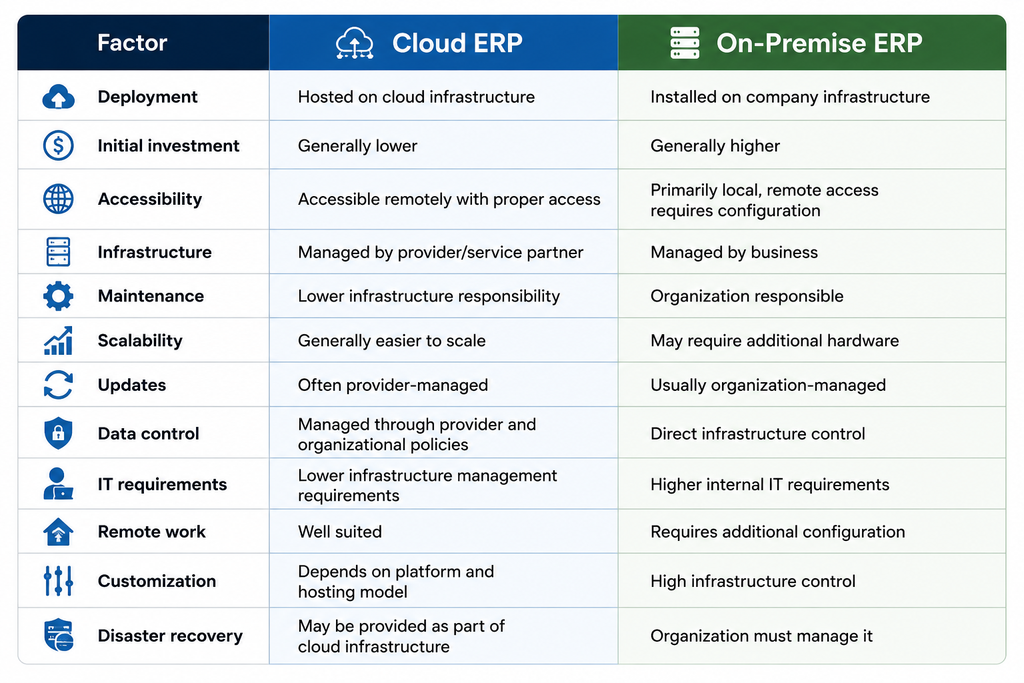
The fundamental difference between Cloud ERP and On-Premise ERP is where the system is hosted and who is responsible for managing the underlying infrastructure. With Cloud ERP, the system is hosted on cloud infrastructure and accessed remotely, while infrastructure management is generally handled by the cloud provider or service partner. With On-Premise ERP, the system is hosted on infrastructure controlled by the organization, giving the business more direct responsibility for hardware, networking, security, maintenance, and upgrades.This difference affects almost every aspect of ERP ownership, including implementation costs, accessibility, maintenance, scalability, security management, and IT requirements.
Cost of Cloud ERP vs On-Premise ERP
Cost is one of the biggest factors businesses consider when choosing an ERP deployment model. However, organizations should look beyond the initial purchase price and evaluate the total cost of ownership over several years.Cloud ERP generally requires a lower initial investment because businesses do not necessarily need to purchase and maintain their own server infrastructure. Instead, organizations commonly pay a subscription or service fee based on the selected deployment and licensing model.
On-Premise ERP generally requires a larger upfront investment. Businesses may need to purchase servers, networking equipment, storage systems, operating software, security infrastructure, and other hardware. They also need to allocate resources for ongoing maintenance and upgrades.Although On-Premise ERP may avoid certain recurring subscription costs depending on the licensing arrangement, the organization still incurs expenses related to hardware replacement, electricity, cooling, IT personnel, security, backups, and maintenance.Therefore, businesses should compare the five- to ten-year total cost rather than comparing only the initial software price.
Accessibility and Remote Work
Accessibility is another major difference between the two deployment models.Cloud ERP can generally be accessed from different locations through an internet connection and appropriate authentication. This makes it particularly useful for organizations with remote employees, multiple branches, traveling employees, or distributed teams.For example, a sales employee visiting a customer can access relevant information without being physically present at the company's office, provided the organization has configured remote access appropriately.On-Premise ERP can also be made accessible remotely through technologies such as VPNs and secure remote-access configurations. However, providing secure remote access may require additional infrastructure and IT management.For businesses with employees working across different locations, Cloud ERP can therefore provide greater convenience and flexibility.
Maintenance and IT Responsibilities
Maintenance is one of the areas where Cloud ERP and On-Premise ERP differ significantly.With Cloud ERP, infrastructure maintenance is generally handled by the cloud provider or service provider. Activities such as server management, infrastructure monitoring, backups, and certain system updates may be included within the service.This reduces the infrastructure workload for the company's internal IT team.With On-Premise ERP, the organization is responsible for maintaining its own infrastructure. IT teams need to monitor servers, manage storage, apply security updates, maintain backups, troubleshoot hardware issues, and plan infrastructure upgrades.For businesses with strong internal IT teams, this may not be a major concern. For smaller businesses with limited technical resources, however, the additional responsibility can become a significant operational burden.
Scalability and Business Growth
Businesses rarely remain the same size. They may add employees, branches, warehouses, customers, transactions, and business processes over time. Therefore, scalability should be considered when selecting an ERP deployment model.Cloud ERP generally makes scaling infrastructure easier because cloud resources can often be adjusted according to business requirements. Organizations can increase resources as their transaction volume or user base grows, depending on the provider and architecture.On-Premise ERP can also scale, but expansion may require additional hardware, storage, networking capacity, and infrastructure planning. If a company's server capacity becomes insufficient, purchasing and installing additional infrastructure may take time and investment.For rapidly growing businesses, the flexibility of cloud infrastructure can therefore be an important advantage.
Security and Data Control
Security is often one of the first concerns when businesses consider moving ERP systems to the cloud. Some organizations believe that keeping servers on-site automatically provides greater security, while others prefer cloud providers because of their dedicated security infrastructure.In reality, security depends on many factors, including system configuration, access controls, authentication, encryption, network security, monitoring, patch management, backup procedures, and organizational policies.
On-Premise ERP gives businesses direct control over their infrastructure and data environment. This can be valuable for organizations with specialized security or compliance requirements.Cloud providers, meanwhile, can invest heavily in infrastructure security, monitoring, redundancy, and disaster recovery. However, businesses still need to configure their ERP environment properly and manage user access securely.The right approach depends on the organization's security requirements and its ability to manage those requirements effectively.
Software Updates and Upgrades
ERP systems need regular updates to address bugs, improve functionality, maintain security, and support changing business requirements.Cloud ERP typically simplifies this process because updates may be managed by the service provider, depending on the ERP and hosting arrangement. This reduces the amount of technical work required from the organization's internal IT team.With On-Premise ERP, the organization generally has more control over when and how updates are applied. This can be beneficial for companies that need to carefully test changes before deploying them.However, managing upgrades internally requires technical expertise and planning. Organizations also need to ensure that customizations and integrations continue to function after an upgrade.
Customization and Control
On-Premise ERP can provide organizations with extensive control over the infrastructure and deployment environment. Businesses with highly specialized requirements may value this level of control.Cloud ERP can also support significant customization, depending on the ERP platform and hosting model. However, certain cloud environments may have restrictions on modifying the underlying infrastructure or software.Businesses should therefore distinguish between ERP customization and infrastructure control. A cloud-based ERP can still be highly customizable while the underlying servers remain managed by a cloud provider.
Reliability and Business Continuity
Business continuity is another important consideration. ERP systems contain critical business information, so downtime can affect sales, accounting, inventory, production, and customer service.Cloud providers may offer infrastructure redundancy, automated backups, monitoring, and disaster recovery capabilities depending on the service selected. This can help businesses improve availability without building all of the infrastructure themselves.On-Premise ERP gives businesses direct responsibility for their disaster recovery strategy. Organizations need to maintain reliable backups, backup infrastructure, recovery procedures, and contingency plans.Companies using either model should have a clearly documented disaster recovery and business continuity strategy.
Benefits of Cloud ERP
Cloud ERP provides several advantages for businesses. It can reduce the need for significant upfront infrastructure investment and allow employees to access business information remotely. It can also reduce the burden of server maintenance and make it easier for organizations to scale their infrastructure as requirements change.Cloud ERP is particularly attractive to businesses that want faster deployment, flexible access, predictable operational planning, and reduced dependence on internal infrastructure management.
Challenges of Cloud ERP
Despite its advantages, Cloud ERP also has considerations that businesses should evaluate. Reliable internet connectivity becomes important because users typically access the system over a network. Organizations also need to carefully evaluate their cloud provider's security practices, data policies, service availability, backup strategy, and support arrangements.Subscription-based pricing can also create ongoing costs, so businesses should calculate the long-term cost rather than focusing only on the initial investment.
Benefits of On-Premise ERP
On-Premise ERP provides organizations with greater direct control over their infrastructure and deployment environment. Businesses can determine how servers are configured, how data is stored, and how infrastructure is managed.This approach can be suitable for organizations with strong internal IT capabilities, specialized compliance requirements, or a need for extensive control over their infrastructure.On-Premise ERP can also be useful for businesses operating in environments where internet connectivity is limited or where specific infrastructure requirements make local deployment preferable.
Challenges of On-Premise ERP
The biggest challenge of On-Premise ERP is the infrastructure responsibility it places on the organization. Businesses need to manage servers, storage, backups, security, maintenance, updates, and hardware replacement.The initial investment can also be significant, especially for small and medium-sized businesses. As infrastructure ages, organizations may need to invest in new hardware and upgrade their systems.
Which ERP Deployment Model Is Better for Small and Medium Businesses?
For many small and medium-sized businesses, Cloud ERP can be an attractive option because it reduces the need for significant infrastructure investment and internal IT management. Businesses can focus more on their operations while the infrastructure is managed by the service provider.However, this does not mean that On-Premise ERP is unsuitable for SMEs. A business with an existing IT infrastructure, specialized security requirements, or strong technical expertise may benefit from an On-Premise deployment.The right choice should be based on business requirements rather than simply choosing the option that appears cheaper or more modern.
Which ERP Approach Is Right for Your Business?
There is no universal answer to the Cloud ERP vs On-Premise ERP question. The right choice depends on several factors, including business size, budget, IT capabilities, security requirements, remote work requirements, scalability expectations, compliance needs, and long-term business strategy.A business that wants flexibility, remote accessibility, lower infrastructure responsibility, and easier scalability may find Cloud ERP more suitable.A company that requires maximum control over infrastructure, has specialized compliance requirements, and maintains a capable internal IT team may prefer On-Premise ERP.Businesses should also consider a hybrid approach where appropriate. Some organizations may choose to keep specific systems or data on their own infrastructure while using cloud-based applications for other functions.
Questions Businesses Should Ask Before Choosing
Before selecting a deployment model, businesses should evaluate their requirements carefully. They should ask whether they have the internal IT resources required to maintain servers, how much upfront investment they can make, how important remote access is, what their data security requirements are, and how quickly they expect the organization to grow.They should also examine the ERP provider's pricing structure, hosting options, backup policies, security measures, support services, customization capabilities, integration options, and upgrade policies.A detailed assessment before implementation can help businesses avoid unexpected costs and operational difficulties later.
Cloud ERP and On-Premise ERP both offer effective ways to manage business operations, but they provide different levels of infrastructure control, accessibility, cost structure, and maintenance responsibility.Cloud ERP can provide businesses with flexible access, easier scalability, reduced infrastructure management, and faster deployment. On-Premise ERP provides greater direct control over infrastructure and can be suitable for organizations with specialized requirements and strong internal IT capabilities.The best ERP approach is ultimately the one that aligns with the organization's operational needs, budget, security requirements, technical capabilities, and long-term growth strategy. Instead of choosing based solely on technology trends or initial costs, businesses should evaluate the total cost of ownership and expected business impact.With proper planning and implementation, both Cloud ERP and On-Premise ERP can help organizations streamline processes, improve visibility, reduce manual work, and create a stronger foundation for sustainable business growth.
📞 Want to explore how ERPNext can support your business growth?
Contact Nexeves today and take the next step toward a smarter ERP journey.
Planning ERPNext for your business in India or the GCC?
Book a free demo with Nexeves Technologies, an ERPNext implementation partner for India and the GCC.
Book a Free Demo Chat on WhatsApp

No comments yet. Login to start a new discussion Start a new discussion